
Filip Kopta
Safety professional · LinkedIn article, 5 May 2026
Filip Kopta published an account of testing MeineGBU and moving from a risk assessment to training preparation. Read his experience on LinkedIn.
Read the review on LinkedIn
Excel template · Free example · Draft
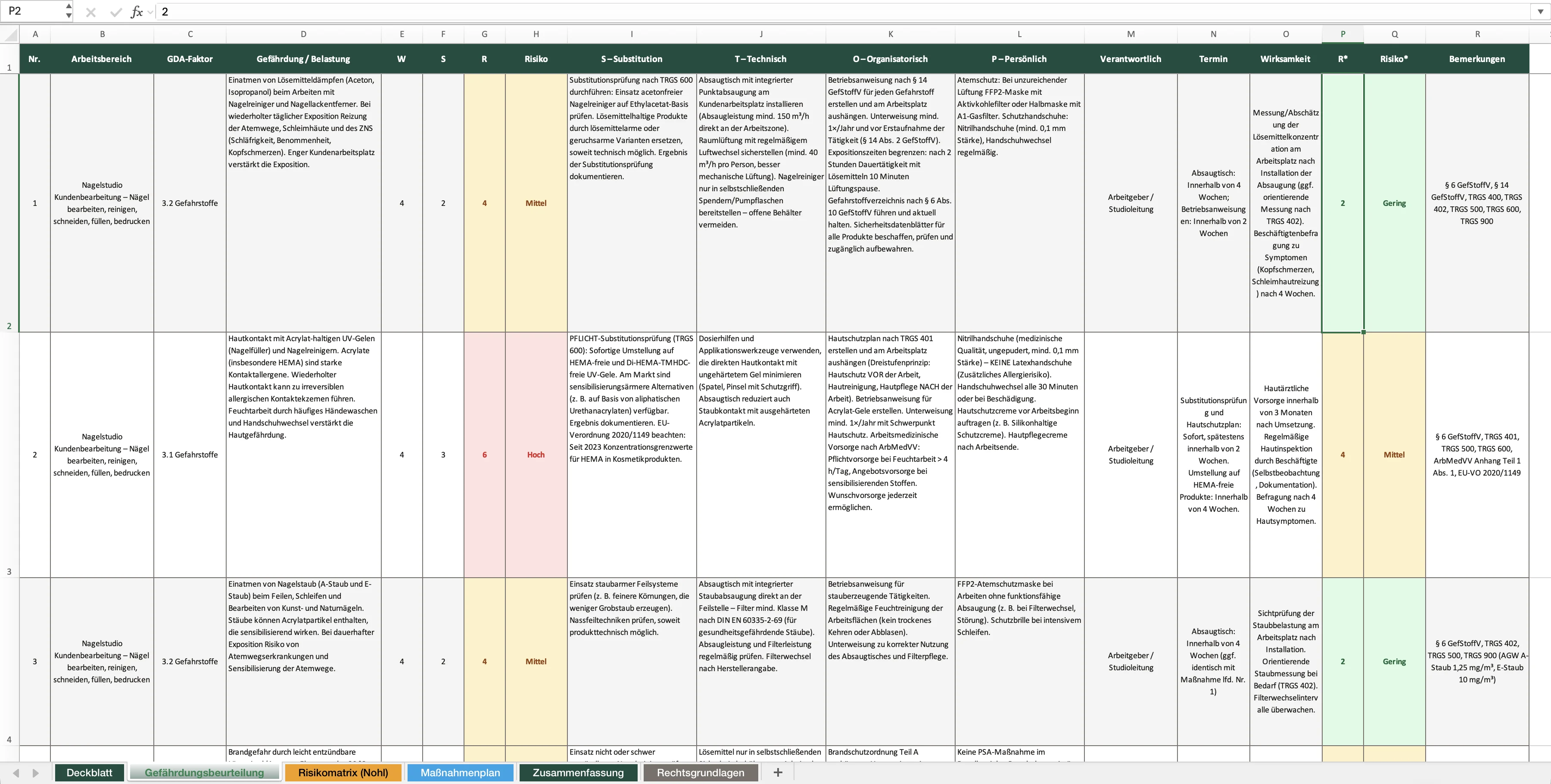
Compare a blank template with a filled retail working draft. Then prepare an editable assessment for your workplace and arrange competent review.
Complete editable GBU draft: €49 as a one-time pack (5 safety coins). Review it with the necessary expertise before use.

For your own workplace
The template remains free. If you need a completed starting point for your workplace, MeineGBU prepares a draft from your information. View your own preview first, then decide whether to unlock it.
A shortened screen recording using synthetic workplace data: enter facts, review suggestions, inspect selected results and edit the unlocked draft. The interface shown is German; English captions are available.
This example demonstrates the interface. It is not an approved risk assessment or a benchmark for completion time. See the current offer for prices and included services.
Unlock the complete GBU draft including Excel download: €49 one-time.
With the matching one-time package of 5 safety coins.
No subscription required. Optional expert review costs extra.
The example is available without an account. It shows an unreviewed retail draft, not an approved assessment for your workplace.
Unlock the complete GBU draft including Excel download: €49 one-time.
The entry package contains the 5 safety coins required for one complete GBU. No subscription required. Optional expert review costs extra. All prices and packages
Eine leere Excel-Vorlage hilft bei der Struktur, enthält aber noch keine Beurteilung Ihres Betriebs. Sehen Sie sich das frei zugängliche Einzelhandelsbeispiel an: Es zeigt den Aufbau eines ausgefüllten Entwurfs. Ein eigener MeineGBU-Entwurf basiert auf Ihren Angaben und muss mit den tatsächlichen Tätigkeiten abgeglichen, ergänzt und fachkundig geprüft werden.
Excel
editierbar und prüfbar
gut zum Ausdrucken
Word
oft unübersichtlich
Pflicht
Inhalt zählt, nicht Format
The content is based on German occupational safety law, GDA methodology, the Nohl risk matrix and practical FaSi experience. Content version: 10/23/2026
Technical sources
Die Dateien sind frei verlinkbar und helfen bei der ersten Struktur. Für eine prüffähige GBU müssen die Inhalte betriebsspezifisch ausgefüllt und bewertet werden.
Warum generische Excel-Vorlagen oft nicht ausreichen
Eine Vorlage kennt die konkreten Tätigkeiten, Arbeitsmittel und Schutzmaßnahmen Ihres Betriebs nicht.
Eine vorhandene Matrix bewertet Gefährdungen nicht von selbst. Annahmen und Einstufungen müssen begründet werden.
Allgemeine Quellenangaben sagen noch nicht, welche Anforderungen für Ihren Arbeitsbereich gelten.
Neben Maßnahmen müssen Zuständigkeiten und die Überprüfung ihrer Wirksamkeit geklärt werden.
Branche und konkrete Tätigkeit liefern den Kontext für einen KI-gestützten Entwurf.
Die erzeugte Excel nutzt eine 4×4-Nohl-Nachschlagetabelle mit Risikomaßzahlen 1 bis 7.
Genannte Rechts- und Normenbezüge müssen auf Aktualität und Anwendbarkeit geprüft werden.
Vorschläge nach dem STOP-Prinzip mit Zuständigkeiten und Terminen für den Betrieb konkretisieren.
Der Entwurf kann zusätzlich einer Fachkraft für Arbeitssicherheit zur Prüfung vorgelegt werden.
Die Excel-Datei kann nach dem Download ergänzt und fortgeschrieben werden.
An unreviewed MeineGBU draft for retail. Explore the tabs and download the complete Excel file without signing up. The action plan and legal basis tabs show separate format examples. Before use, a competent person must check the details, risks and measures against the actual workplace.
Screenshots from different tasks and work areas: edit hazards, risk levels and special review tabs directly in the dashboard.
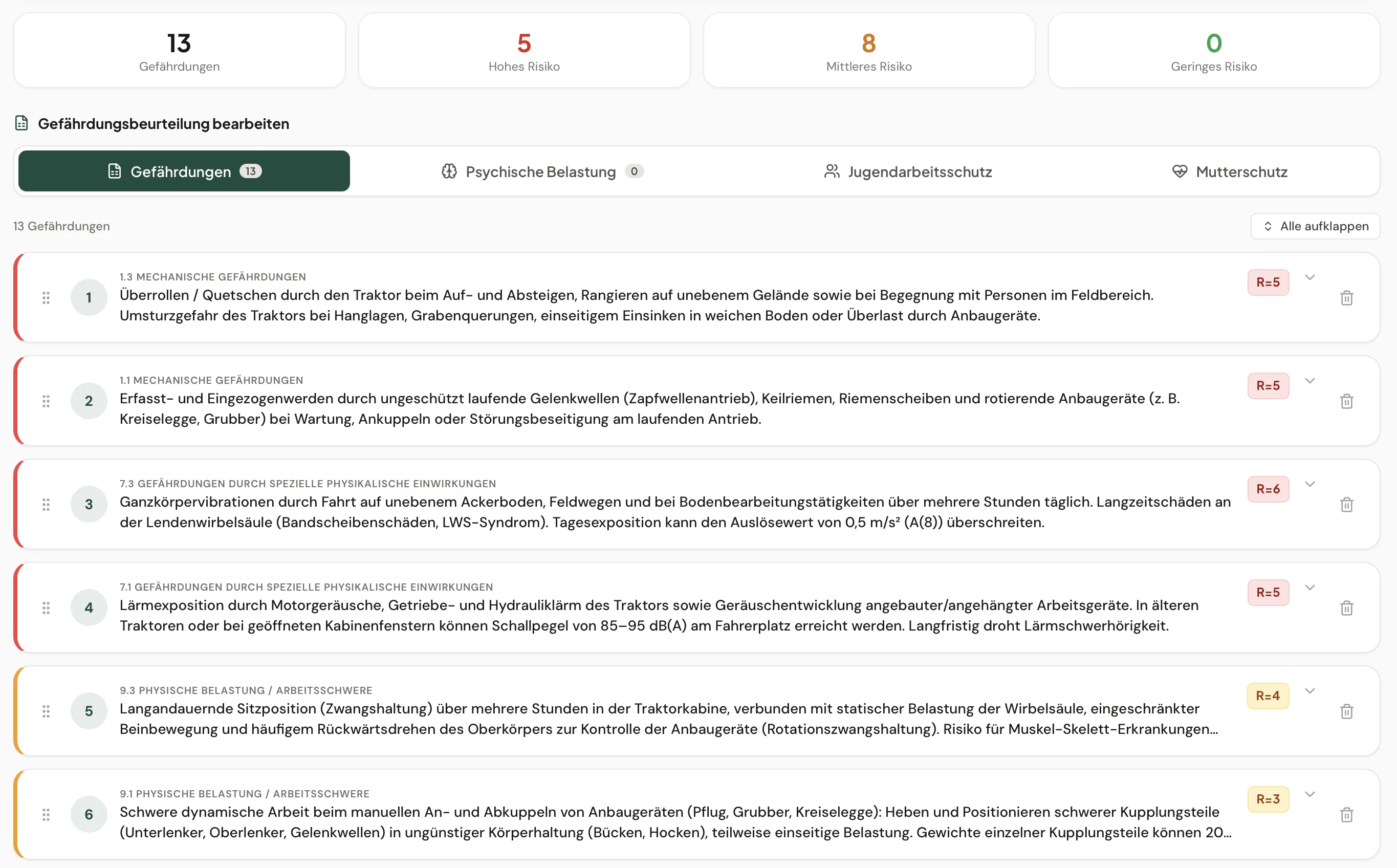
Free, without email or registration. This example shows the output structure; adapt and professionally review your own workplace assessment.
From professional practice
Safety professional · LinkedIn article, 5 May 2026
Filip Kopta published an account of testing MeineGBU and moving from a risk assessment to training preparation. Read his experience on LinkedIn.
Read the review on LinkedInJa. Die leere XLSX-Vorlage und das ausgefüllte Einzelhandelsbeispiel sind ohne Registrierung zugänglich. Ein eigener KI-gestützter Entwurf ist kostenpflichtig; den vollständigen Preis sehen Sie auf der Preisübersicht.
Das Dateiformat allein beantwortet diese Frage nicht. Entscheidend sind die tatsächlichen Arbeitsbedingungen, eine nachvollziehbare Bewertung, passende Maßnahmen und deren Überprüfung. Lassen Sie Ihre Beurteilung fachkundig prüfen.
Die Einzelhandelsdatei zeigt den Aufbau eines ausgefüllten Arbeitsentwurfs. Sie ist keine freigegebene Beurteilung für Ihren Betrieb und darf nicht ungeprüft übernommen werden.
Ja, die Excel-Datei ist voll editierbar. Sie können Gefährdungen hinzufügen, Maßnahmen anpassen und die Datei als Grundlage für künftige Aktualisierungen nutzen.
Gefährdungsbeurteilung Vorlage: PDF, Word oder Excel?
Vorlage · PDF · Word · Excel
Create a risk assessment
Pillar guide · Draft in ~10 minutes
Nohl risk matrix
Nohl 4×4 · Risk score 1–7 · Free calculator
GBU software for safety professionals
For safety professionals · Editable drafts · Your expertise
Risk assessment duty & fines
Legal duty · ArbSchG · Fines
Try your own GBU
Describe your activities and see selected hazards and suggested measures for your workplace. You can then pay to unlock the complete draft.
Eligible new users can get one free preview with up to three hazards after registration and email verification. No credit card required.
Unlock the complete GBU draft including Excel download: €49 one-time.
The entry package contains the 5 safety coins required for one complete GBU. No subscription required. Optional expert review costs extra. All prices and packages